The 2026 monsoon has been interesting for me in many ways, and one of them was finding myself preferring metro transit over everything else, because of how bad the roads are right now .
That made me, and several of y’all, use InTransit 4× as much than the summer! And with that in mind, since WWDC 26, I’ve been thinking about and reimagining how InTransit is used by users and how it can be improved for the iOS 27 release!
Today, a new update for InTransit launches on the AppStore, and it brings a lot of improvements to the UI, as well as, improvements to the how the app functions.
Live Activity

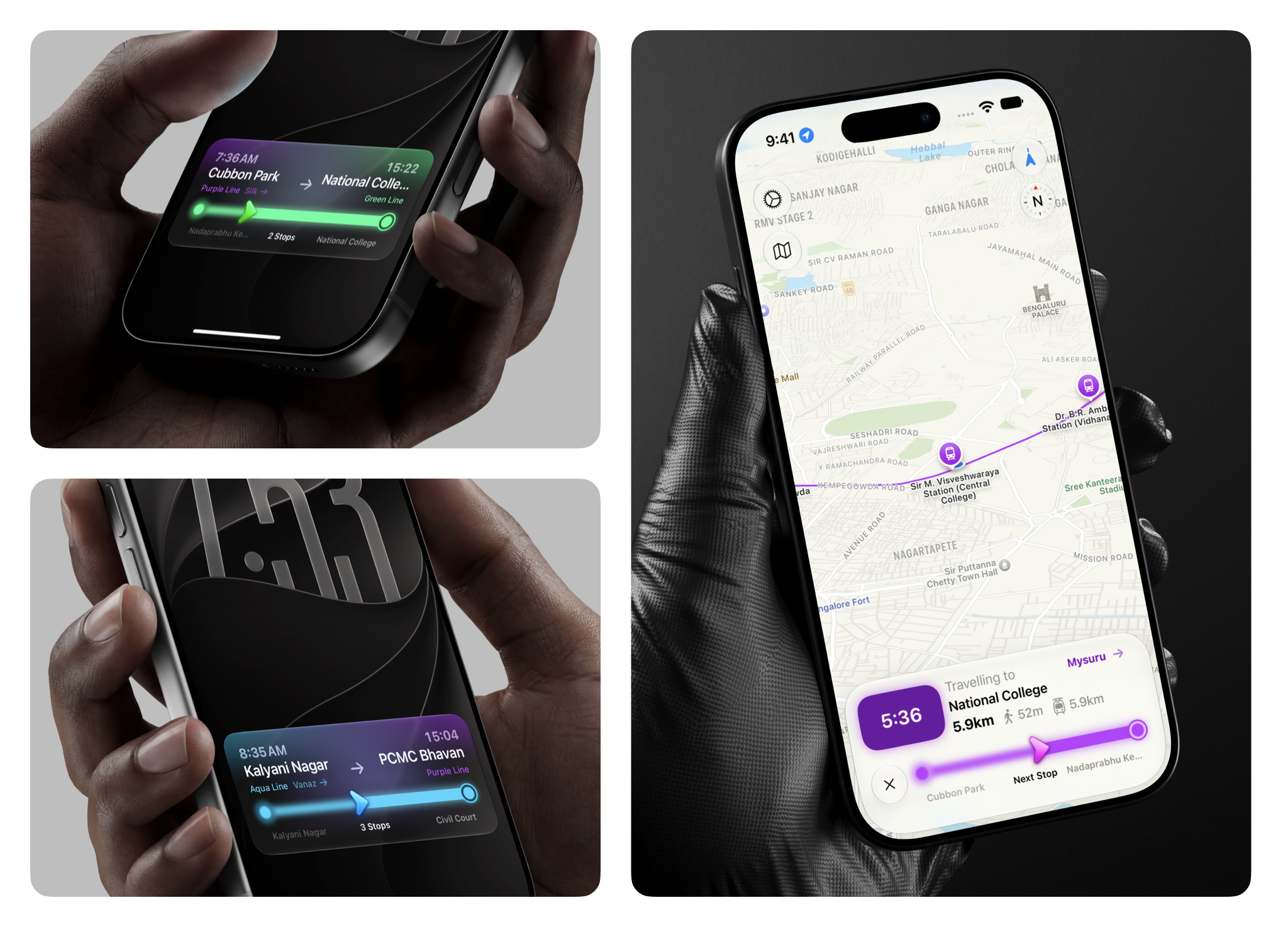
One of the better improvements is coming to the Live Activity, which now adopts the glass look, but retains its full character by blending colours between the departure and arrival stations.
This isn’t just a random gradient slapped on the glass with a left-to-right, from-to, logic. It’s a lot more nuanced, especially for blending colours between non-contigous hues. Apple already provides tools for doing this correctly, and InTransit leans into that to provide you the best experience.
Journey Details

The journey is most the important part of metro transit, obviously. The Luna update brings improved visual cues to these cards.
Once you’re on boarded and on your way to the destination station, the Live Activity now pings you when next station approaches, so you need to check less, and continue to enjoy the music, the book, or just the chatter around you.
Full changelog below:
New
- Significantly improved live tracking underground and in other low-signal areas: your progress, next station, and arrival are now tracked correctly through much longer stretches of poor GPS, falling back to your phone's motion sensors to keep boarding detection and your position on the map working when GPS alone isn't enough.
- Added an estimated position marker on the map (shown with a dashed ring so it's clearly marked as an estimate) for when GPS signal drops out entirely.
- Station search now groups results by metro line (sorted by distance) and adds a line filter bar, plus quick picks for your Home and Work stations.
- Continued the visual refresh across the pre-boarding screen, in-navigation bar, bottom sheet, and station details, with improved color contrast, larger-text support, and VoiceOver labels throughout.
- Added a way to back out of the From/To station confirmation screen.
- Polished the onboarding experience with clearer messaging, full support for larger text sizes, and smoother animations for those who prefer reduced motion.
Improvements
- The app now lets you know if background tracking can't stay active because "Always Allow" location access hasn't been granted, so you can fix it before your next trip.
- Redesigned Travelogue into one unified screen — your trips, distance, time, lines ridden, badges, and environmental impact stats together in one place — with a new "See All Trips" screen and a route thumbnail on each trip.
- Polished the Live Activity's colors and visual style, and fixed a display issue on Apple Watch.
- Improved the reliability of live location tracking while navigating a route in the background, so your position on the map stays accurate for longer.
- The app now asks for location access more thoughtfully — only requesting "Always Allow" permission when you actually start navigating a route.
Fixes
- Fixed eco stats (CO2, energy, and trees saved) showing wildly inflated numbers, and a bug where the app could miss your final arrival on routes that include a walk to or from the station.
- Fixed the "Start" journey button getting stuck disabled when boarding from a station with poor GPS reception.
- Fixed a couple of crashes — one opening the search filter bar, another tied to loading your saved app data — plus a bug where filter buttons could trigger on their own without being tapped.